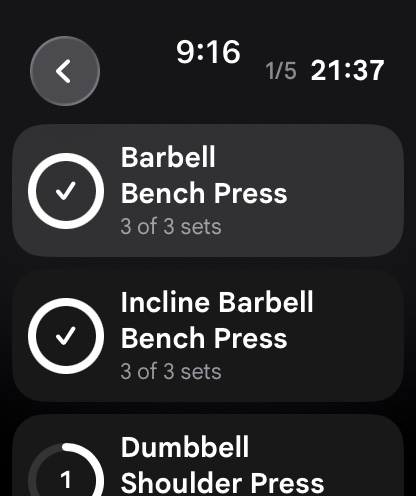
For years, strength athletes using Android devices and smartwatches faced a frustrating technology gap compared to iOS users. While runners, cyclists, and triathletes enjoyed mature wearable ecosystems with granular pacing metrics and GPS mapping, lifters in the weight room were left with generic timers, clunky touch interfaces, and smartphone dependencies that broke concentration during heavy lifting sessions. However, the maturation of Wear OS 4 and Wear OS 5 on Samsung Galaxy Watch and Google Pixel Watch hardware has completely altered this landscape. Today, an engineered Wear OS workout tracker transforms an Android smartwatch into a dedicated, autonomous strength training computer directly on your wrist.
In this technical and practical guide, we evaluate the state of Wear OS strength tracking in 2026. We examine sensor mechanics, the biological differences between aerobic tracking and resistance logging, UI usability under sweat and chalk, haptic rest interval governance, and how advanced inertial sensors unlock velocity and effort metrics previously reserved for laboratory linear position transducers.
1. The Fundamental Disconnect Between Aerobic and Resistance Tracking
To understand why standard smartwatch fitness trackers fail inside a squat rack or deadlift platform, one must examine their underlying sensor architecture. Mainstream fitness wearables from Fitbit, Garmin, and basic smartwatch modes were engineered fundamentally for steady-state cardiorespiratory activities. Their algorithms depend almost exclusively on optical photoplethysmography (PPG) to calculate heart rate and estimate caloric expenditure.
During heavy resistance training, this physiological model breaks down completely. When you perform a maximal set of deadlifts, barbell rows, or heavy dumbbell presses, intense isometric contraction of the forearm musculature elevates intramuscular pressure above capillary pressure. This temporarily restricts blood flow beneath the optical wrist sensor, creating severe optical distortion, motion artifacts, and delayed heart rate reporting. By the time your optical sensor registers an elevated heart rate, you have already completed the set and re-racked the weight.
Furthermore, evaluating a strength session through the lens of calories burned is a profound biological fallacy. A grueling set of five repetitions on the barbell back squat at 85% of one-rep maximum (1RM) generates extraordinary mechanical tension and high-threshold motor unit recruitment. Yet because the mechanical work duration is under thirty seconds, the immediate caloric expenditure is negligible compared to steady-state jogging. Strength athletes do not require aerobic calorie estimates; they need an objective workout tracker that logs exact poundages, completed repetitions, proximity to failure, and enforces disciplined rest intervals.
2. Hardware Deep Dive: Samsung Galaxy Watch vs. Google Pixel Watch
When selecting a Wear OS smartwatch specifically for resistance training, physical hardware engineering directly influences durability, ergonomics, and live gym usability. The two dominant hardware platforms – Samsung Galaxy Watch and Google Pixel Watch – offer distinct strengths and trade-offs in a gym environment.
Samsung Galaxy Watch (Watch 5 Pro, Watch 6 Classic, Watch 7, Watch Ultra)
Samsung remains the hardware heavyweight of the Android wearable world. For serious lifters, the physical rotating bezel found on Classic models (or the tactile digital edge bezel on standard models) is an extraordinary asset. Between grueling sets of bench presses or overhead presses, fine motor control is degraded by systemic fatigue, sweat, and lifting chalk. Attempting to tap tiny numerical sliders on a wet capacitive glass screen frequently results in missed inputs. The physical rotating bezel allows lifters to adjust loads in crisp 2.5 kg increments with a simple mechanical twist that provides tactile detent feedback.
Moreover, Galaxy Watch Ultra and Pro variants feature rugged titanium casings and scratch-resistant sapphire crystal glass. In a weight room where wrists regularly brush against knurled steel barbells, dumbbell racks, and heavy carabiners, sapphire crystal prevents micro-abrasions that destroy standard tempered glass.
Google Pixel Watch (Pixel Watch 2 and Pixel Watch 3)
Google’s Pixel Watch hardware excels in aesthetic refinement, compact wrist ergonomics, and haptic engine fidelity. The custom linear resonant actuator inside the Pixel Watch delivers sharp, directional haptic pulses that cut through loud gym background music, ensuring you never miss a rest timer alert. Furthermore, the optical sensor array on the Pixel Watch 2 and 3 provides exceptional responsiveness during high-intensity intervals.
However, the signature domed glass design of the Pixel Watch presents an exposed edge. In a heavy lifting environment, this curved perimeter is vulnerable to direct impacts against iron plates. Trainees using a Pixel Watch for barbell and kettlebell work are strongly advised to install a low-profile matte bumper case to safeguard the crystal against knurling impacts.
3. Sensor Architecture: Inertial Measurement Units in Strength Logging
Modern Wear OS hardware houses a 6-axis Inertial Measurement Unit (IMU), consisting of a tri-axial accelerometer and a tri-axial gyroscope. When sampled at high frequencies (50 Hz to 100 Hz), these sensors capture continuous kinematic telemetry regarding wrist trajectory, velocity vectors, and angular rotation.
In advanced strength applications like IMPOLS, this sensor stream is processed through digital signal filters to enable automated repetition detection and movement velocity profiling. Consider a standard barbell bench press: as the bar descends toward the sternum during the eccentric phase, the accelerometer detects a continuous negative acceleration curve. At the bottom turnaround point, acceleration reverses as the lifter initiates the concentric drive. By calculating the mathematical zero-crossing points in the acceleration curve, the software automatically increments the repetition count without requiring manual screen taps.
Beyond rep counting, high-speed IMU analysis unlocks intuitive training paradigms. In human physiology, concentric bar velocity is inversely proportional to muscle fatigue. As a lifter approaches concentric muscular failure, velocity unavoidably drops due to metabolic substrate depletion and motor unit decruitment. By measuring the velocity decay across consecutive repetitions within a set, intelligent algorithms can quantify true Reps in Reserve (RIR) and assign an objective Effort score to every working set.
4. The Ergonomics of Rest Interval Governance
Rest interval discipline is one of the most neglected variables in gym progression. When trainees rely on smartphone timers, cognitive friction occurs. To check the timer, you must retrieve your phone from the floor, unlock the screen, and navigate away from text messages or music controls. Inevitably, glancing at a phone screen invites digital distraction, turning a planned two-minute rest interval into an accidental four-minute delay.
A wrist-based Wear OS gym tracker solves this by shifting rest governance entirely to haptic feedback. The instant you complete a set and confirm your reps with a quick bezel click, your watch initiates a high-priority countdown timer. While resting, your display shows the remaining seconds in bold typography alongside your previous target numbers for the upcoming set. When the timer expires, a distinct rhythmic vibration buzzes your wrist. You step up to the barbell with zero wasted seconds, preserving consistent metabolic stress and neuromuscular conditioning across every microcycle.
5. Wear OS Strength Tracker Comparison Matrix
The following technical matrix evaluates the core architectural features required for dedicated resistance training across current wearable platforms:
| Feature / Metric | IMPOLS for Wear OS | Standard Android Wear Trackers | Samsung Health Workout | Google Fitbit Exercise |
|---|---|---|---|---|
| Standalone Wrist Logging | Full autonomy; routine creation and editing directly on watch | Requires active Bluetooth tether to phone in gym bag | Basic start/stop tracking with non-customizable lists | Aerobic focus; no dedicated strength set architecture |
| Sensor Rep Detection | 6-axis IMU kinematic filtering with velocity profiling | Manual screen taps only; zero sensor integration | Rudimentary rep counter; prone to false positives | None; counts only elapsed duration and heart rate |
| Rotary Crown & Bezel Input | Full hardware dial support for weight and rep adjustments | Inconsistent touch-only interface prone to sweat errors | Partial support on select Galaxy Watch models | No hardware dial integration |
| Haptic Rest Timers | High-priority multi-stage haptic vibration with auto-advance | Generic audio notification easily drowned out in gym | Basic single vibration pulse | Manual stopwatch only |
| Ecosystem Synchronization | Two-way sync with Google Health Connect, iOS, and Apple Watch | Proprietary closed database; zero health sync | Samsung Health cloud only | Fitbit cloud ecosystem only |
| Integrated Biological Context | Direct connection to macro tracker and muscle recovery map | Isolated workout logger with no nutritional tools | Basic manual caloric tracking | Basic food logging via smartphone app |
6. Step-by-Step Protocol: Optimizing Wear OS for the Weight Room
To eliminate battery drain, avoid missed inputs, and ensure flawless live tracking during heavy lifting, follow this four-phase operational protocol:
Phase 1: Watch OS Optimization and Permission Setup
Before entering the gym, adjust your Wear OS device settings to prevent operating system throttling. Open Watch Settings → Display → Turn On “Always-on Screen”. This guarantees that your active set data remains visible without requiring an exaggerated wrist-raise motion while holding heavy dumbbells. Next, navigate to Settings → Apps → Special App Access → Battery Optimization, and select “Don’t Optimize” for your workout tracker. This prevents Wear OS background task managers from killing your active session during prolonged rest intervals.
Phase 2: Routine Architecture and Pre-Loading
Pre-building your workout routines on your smartphone’s workout tracker before you arrive at the gym is essential for training focus. Structure your sessions with designated exercises, warm-up progressions, target rep brackets (e.g., 6 to 8 reps on compound lifts, 10 to 12 reps on isolation work), and pre-set rest periods. When you walk through the gym doors, open the watch app, select your routine, and leave your mobile device securely in your locker.
Phase 3: Live Set Execution and Rotary Adjustment
Step up to your first exercise. As you unrack the weight, your watch continuously tracks movement kinematics. Once your set is completed, glance at your wrist: confirm your completed repetitions, use the rotary bezel or crown to adjust the load if you exceeded your target, and tap the checkmark. Your data is instantly stored, your progressive overload baseline updates, and the haptic rest timer engages immediately.
Phase 4: Session Completion and Health Connect Sync
Upon finishing your final working set, tap “End Workout”. Your Wear OS app compiles total tonnage, volume load per muscle group, average concentric effort, and total rest duration. This data is automatically broadcast via Google Health Connect to your central health dashboard, immediately updating your muscle recovery readiness map to guide tomorrow’s training split.
7. Signal Processing: Solving the Sweat and Noise Dilemma
In real-world gym environments, two physical factors threaten digital logging accuracy: moisture and non-exercise wrist motion. Sweaty skin introduces electrical resistance changes across capacitive touchscreens, resulting in unresponsive buttons or erratic phantom taps. High-performance Wear OS software overcomes this by employing physical hardware key mappings: pressing the primary side button can be assigned to log a set, completely bypassing the touch display.
Regarding sensor noise, lifters constantly perform auxiliary arm motions between sets: drinking from shaker cups, adjusting knee sleeves, chalking hands, and re-racking plates. If an algorithm relied purely on raw acceleration peaks, these routine movements would be miscounted as repetitions. Modern signal processing employs high-order Butterworth filtering and dynamic time warping to match incoming sensor waves against true human lifting kinematic templates. If an arm motion lacks the rhythmic phase reversal of a true repetition, the algorithm rejects the signal, preserving pristine training data.
8. Common Wear OS Gym Logging Mistakes
Mistake 1: Wearing the Watch Loosely
A loose watch strap causes the watch chassis to bounce on the wrist during rapid concentric reversals, introducing excessive mechanical noise into the accelerometer readings. Fasten your strap snugly one finger-width above the wrist joint (ulnar head) to ensure optimal sensor coupling.
Mistake 2: Conflict with Heavy Wrist Wraps
Trainees wearing heavy 18-inch or 24-inch elastic wrist wraps during bench pressing or overhead pressing often find the wrap covers their watch. Simply slide the watch two to three inches higher up your distal forearm. Modern sport silicone bands possess ample adjustability to maintain secure contact above the wrap line.
Mistake 3: Relying on Cloud Connectivity During Workouts
Commercial gym basements and concrete weight rooms are notorious dead zones for cellular and Wi-Fi signals. Ensure your chosen workout tracking platform features 100% offline local SQLite database storage on the watch itself, synchronizing with the cloud only when connectivity is seamlessly restored.
9. Frequently Asked Questions
Can I use a Wear OS workout tracker completely without my smartphone?
Yes. Premium applications like IMPOLS operate with full standalone architecture on Wear OS. All routine templates, exercise libraries, and historical personal records reside locally on the watch hardware, allowing you to train completely phone-free.
How much battery does a 90-minute lifting workout consume on Wear OS?
On modern smartwatches such as the Samsung Galaxy Watch 6/7 or Google Pixel Watch 2/3, a 90-minute workout utilizing continuous sensor tracking and an always-on display typically consumes between 14% and 20% of total battery capacity, easily leaving ample charge for full-day wear and nocturnal sleep tracking.
Does Wear OS resistance tracking sync with Apple Health or cross-platform friends?
Yes. By utilizing standardized cloud sync protocols and Google Health Connect, workout sessions logged on an Android Wear OS watch synchronize across the entire IMPOLS platform, allowing seamless transition to iOS or sharing data with training partners on Apple Watch.
How does strength tracking connect with my daily nutrition targets?
Every working set and volume load metric captured on your wrist contributes directly to your total daily energy calculation. Syncing this data with an integrated food and macro tracker ensures your daily carbohydrate and protein intake dynamically adjusts to fuel recovery and muscle protein synthesis.
10. Summary and Implementation Checklist
Wear OS smartwatches have graduated from casual notification accessories into essential athletic instruments. By deploying an autonomous, sensor-driven lifting tracker, Android users gain an unprecedented edge in progressive overload precision, rest interval discipline, and distraction-free training focus.
- Equip a modern Wear OS smartwatch with responsive hardware (Samsung Galaxy Watch or Google Pixel Watch).
- Enable Always-on Display and disable aggressive battery optimization for your workout app.
- Pre-program your mesocycle splits and rep brackets into your workout tracker before hitting the gym.
- Utilize the rotary bezel or physical side buttons to eliminate touch errors caused by sweat or chalk.
- Rely on wrist haptics to maintain strict rest interval adherence across all working sets.
- Close the loop by aligning your training volume with your daily macro targets and monitoring biological recovery via a sleep and recovery tracker.