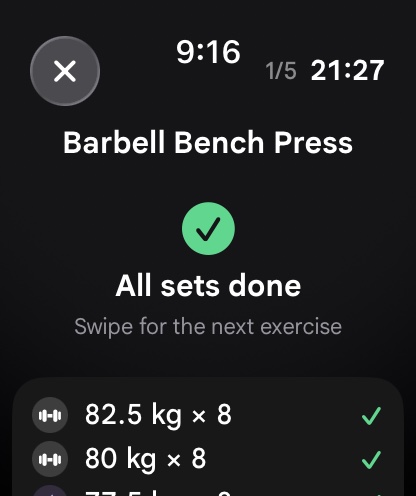
In the wearable technology ecosystem, two software titan architectures dominate the wrist: Apple’s watchOS and Google/Samsung’s Wear OS. While tech reviewers spend endless hours benchmarking battery life, notification sync, and voice assistant fluency for daily office use, serious strength athletes and lifters care about an entirely different set of operational demands. In the weight room, a smartwatch must endure chalk, sweat, and heavy barbell knurling; it must deliver crisp, unmissable haptic countdown alerts that slice through loud gym music; it must execute offline routine caching without phone tethering; and it must synchronize complex biometric telemetry seamlessly into health frameworks. When stepping up to the squat rack, which wearable ecosystem reigns supreme for resistance training?
In this technical head-to-head comparison, we analyze the hardware engineering, sensor accuracy, haptic motors, battery consumption profiles, background execution lifecycles, and health ecosystem integrations (Apple HealthKit vs. Google Health Connect) across both watchOS and Wear OS platforms, evaluating their performance with your workout tracker.
1. Hardware and Industrial Design: Glass, Casings, and Ergonomics
The physical construction of a smartwatch dictates how resilient and comfortable it remains during intense resistance training:
Apple watchOS Hardware (Series 9, Series 10, Ultra 2)
- Form Factor: Apple maintains its iconic rectangular squircle design. The rectangular aspect ratio provides superior ergonomics for tabular workout logging, displaying exercise names, set numbers, target reps, and rest timers simultaneously without awkward corner text clipping.
- Materials and Durability: Standard aluminum models feature Ion-X glass, which is prone to scratching from knurled barbell bars. However, stainless steel and Apple Watch Ultra models feature flat sapphire crystal faces surrounded by raised titanium bezels. The Apple Watch Ultra is arguably the most physically indestructible smartwatch in the gym, virtually impervious to dumbbell impacts.
- Input Controls: The Digital Crown offers buttery smooth mechanical detents with electromagnetic haptics, while the dedicated physical “Action Button” on the Ultra model allows lifters to instantly log sets or advance exercises while wearing thick lifting wraps.
Google / Samsung Wear OS Hardware (Galaxy Watch 6/7/Ultra, Pixel Watch 2/3)
- Form Factor: Wear OS hardware almost universally adheres to circular watch faces. While circular cases look like classic horological timepieces, they present UI challenges for data-dense strength logging. Text strings near the top and bottom of the display must be carefully curved or centered to avoid bezel cutoff.
- Materials and Durability: Samsung’s Galaxy Watch lineup features flat sapphire crystal displays across both standard and Pro/Ultra models, offering exceptional scratch resistance at competitive price points. The Galaxy Watch Ultra introduces a rugged cushion case that protects the display during kettlebell cleans. In contrast, Google’s Pixel Watch features an exposed 3D domed Gorilla Glass curve that requires a protective bumper in the weight room.
- Input Controls: Samsung devices feature physical or capacitive rotating bezels that provide swift menu navigation, while the Pixel Watch utilizes a tactile rotating crown.
2. Technical Comparison Matrix: watchOS vs. Wear OS in the Weight Room
The following table contrasts critical operating system and hardware characteristics for strength athletes across both platforms:
| Evaluation Metric | Apple watchOS Ecosystem (Apple Watch) | Google / Samsung Wear OS Ecosystem (Wear OS) | Lifting Impact & Practical Assessment |
|---|---|---|---|
| Haptic Engine Technology | Apple Taptic Engine (Linear Resonant Actuator) | LRA / ERM Motors (Varies by OEM) | Apple delivers sharper, more unmissable haptic taps through wrist wraps. |
| Screen Shape & Data Density | Rectangular OLED (High density) | Circular AMOLED (Stylized aesthetics) | watchOS displays tabular weight/rep grids with less scrolling required. |
| Optical Heart Rate During Gripping | High sampling rate; excellent capillary filtration | Multi-path BioActive / PPG sensors | Both perform exceptionally; Wear OS matches Apple on latest models. |
| Dedicated Physical Buttons | Action Button (Ultra only), Side Button, Crown | Home key, Back key, Rotating Bezel / Crown | Both allow button remapping to advance sets without touching screen. |
| Health Cloud Framework | Apple HealthKit (Strict on-device privacy) | Google Health Connect (Open Android sync) | Both provide seamless two-way sync with third-party fitness databases. |
| Autonomous Phone-Free Operation | 100% offline routine caching via CoreData | 100% offline routine caching via Room DB | Complete tie: both platforms run full strength routines without phones. |
3. The Haptics Showdown: Apple Taptic Engine vs. Wear OS Actuators
In a loud gym where commercial speakers blast music and weights crash against rubber platforms, audible timer beeps are completely useless. Lifters depend entirely on vibrotactile haptic feedback to know when their 90-second rest interval has elapsed.
Apple’s custom Taptic Engine remains the industry benchmark. Because Apple controls both silicon and motor mechanics, watchOS can produce highly distinct tactile waveforms: sharp clicks, rhythmic pulses, and progressive double-taps that feel crisp and instantaneous on the wrist, easily felt even under tightly bound 18-inch powerlifting wrist wraps.
Wear OS devices have made massive strides. Google’s Pixel Watch series features a custom linear actuator with refined tactile feedback that rivals Apple. Samsung’s Galaxy Watch 6 and 7 utilize powerful linear resonant motors that offer robust vibration strength. In the IMPOLS app, Wear OS lifters can configure “Vibration Boost” to trigger continuous triple-burst haptics, guaranteeing that you never miss a rest timer ending regardless of manufacturer variations.
4. Health Ecosystems: Apple HealthKit vs. Google Health Connect
Logging sets is only meaningful if the physiological strain is shared with your broader health ecosystem:
Apple HealthKit
Apple HealthKit is an on-device, encrypted database that acts as the single source of truth on iOS. Workouts logged via the IMPOLS watch app instantly write active calories, total energy expenditure, heart rate samples, and VO2 max telemetry to HealthKit. This data immediately influences Apple Activity Rings and provides the bioenergetic basis for daily caloric calculations in your food tracker.
Google Health Connect
Google Health Connect is Android’s centralized health API, replacing fragmented proprietary cloud connections. When you complete a workout on a Galaxy Watch or Pixel Watch, IMPOLS writes full exercise sessions, muscular exertion metrics, and continuous heart rate data to Health Connect. This broadcasts your training load across Samsung Health, Google Fit, and your sleep tracker with zero synchronization latency.
5. Step-by-Step Protocol: Optimizing Any Smartwatch for Resistance Training
Whether you wear an Apple Watch or a Wear OS smartwatch, execute this 4-phase configuration protocol before your next lifting session:
Phase 1: Disable Inadvertent Crown Depressions
During heavy barbell bench presses, clean and jerks, or front squats, wrist extension frequently causes the back of your hand to depress the physical crown, accidentally summoning Siri or Google Assistant. In system settings, flip your watch orientation so the crown points up your forearm away from your wrist.
Phase 2: Calibrate Always-On Display and Timeout Limits
Ensure Always-On Display (AOD) is toggled to ON, and set screen wake duration to 70 seconds on watchOS or max timeout on Wear OS. This ensures your active rest counter and next target exercise remain visible when you glance down between heavy sets without awkward arm flailing.
Phase 3: Pre-Workout Standalone Caching
Before leaving the locker room, launch the IMPOLS app on your smartwatch. Select your scheduled workout from your workout tracker. Once loaded, the watch operates 100% autonomously: you can leave your smartphone safely locked in your locker, eliminating text message distractions and social media scrolling.
Phase 4: Post-Session Biological Reconciliation
When you conclude your session, end the workout directly on your wrist. The watch writes your volume load, sets, reps, and cardiovascular exertion directly to HealthKit or Health Connect, updating your muscle recovery map so you know exactly which muscle groups require repair.
6. Battery Drain Benchmarks During 90-Minute Heavy Sessions
Continuous heart rate monitoring, screen-on graphics, and haptic firing consume battery power. Here is how leading flagship models perform during a grueling 90-minute gym workout:
- Apple Watch Ultra 2: Consumes only 4% to 6% battery during a 90-minute session. Its massive 564 mAh cell provides days of continuous lifting and sleep tracking.
- Apple Watch Series 9 / 10 (45mm): Consumes approximately 10% to 14% battery. Lifters can comfortably train in the evening and wear the watch to bed for sleep tracking.
- Samsung Galaxy Watch 7 / Ultra: Consumes 7% to 10% on the Ultra model and 12% to 16% on standard 44mm models. Fast wireless charging provides quick top-ups.
- Google Pixel Watch 3 (45mm): Consumes approximately 9% to 11% battery, a major improvement over the Pixel Watch 1.
7. Biomechanical IMU Telemetry: Velocity and Bar Speed Sensing
Both watchOS and Wear OS platforms provide low-level access to high-frequency inertial measurement units (IMUs). In high-performance intuitive training, these sensors measure concentric acceleration and velocity loss in real time.
Because watchOS enforces strict background thread execution limits, lifting apps must utilize CoreMotion high-rate recording buffers. Wear OS utilizes Android SensorManager with direct continuous FIFO buffers. Both platforms successfully capture barbell kinematics, giving lifters laboratory-grade bar speed feedback on every rep.
7b. Sleep Staging and Autonomic Recovery Comparison
The battle between watchOS and Wear OS extends into the bedroom. Both platforms utilize multi-wavelength PPG sensors and skin temperature sensors to track slow-wave deep sleep, REM sleep, and Heart Rate Variability (HRV).
Apple calculates nocturnal HRV using SDNN natively in Apple Health, which the IMPOLS algorithm converts to rMSSD for accurate parasympathetic analysis. Wear OS devices via Health Connect supply direct millisecond-level rMSSD data. Both ecosystems provide the vital nocturnal telemetry needed to govern daily lifting intensity in your sleep tracker.
7c. Straps and Accessories: Choosing the Right Band for the Gym
The choice of watch strap is an overlooked factor in gym tracking accuracy. Standard silicone sports bands trap sweat and can slide along the wrist during heavy dumbbell curls, disrupting optical heart rate readings. Leather and metal link bracelets are easily ruined by chalk and heavy equipment knurling.
For both Apple Watch and Wear OS devices, the gold standard gym strap is a breathable hook-and-loop nylon loop (such as Apple’s Trail Loop or Samsung’s Fabric Band). Nylon straps allow micro-adjustments, ensuring the optical sensor maintains firm, continuous contact against the skin without restricting blood flow or interfering with wrist wraps.
7d. LTE Cellular Connectivity: Freedom vs. Battery Trade-Offs
Both watchOS and Wear OS offer LTE cellular-enabled variants, allowing lifters to stream music directly to Bluetooth headphones and receive emergency phone calls while leaving their phone at home. However, cellular radios operate at high RF transmission power. In gym basements with poor cellular reception, the watch transceiver boosts power to maintain connection, increasing battery consumption up to 20% per hour.
To maximize battery life during long training sessions, download your favorite workout playlists locally to watch storage beforehand, and toggle Cellular to “Off” in system settings when stepping onto the gym floor. You retain 100% offline workout logging in your workout tracker and music playback while preserving maximum battery life for overnight sleep tracking in your recovery tracker.
8. Frequently Asked Questions
Which smartwatch is overall better for serious lifters: Apple Watch or Wear OS?
Both platforms are exceptional. Apple Watch Ultra offers the finest physical durability and haptics, while Samsung Galaxy Watch Ultra provides outstanding battery life and flat sapphire crystal at a lower price point. Choose the watch that matches your smartphone operating system.
Can I log workouts if my gym has no Wi-Fi or cellular service?
Yes. Both watchOS and Wear OS versions of the IMPOLS app store all exercise databases, routines, and workout histories locally in on-device storage. No internet connection is required while training.
Will lifting straps interfere with heart rate tracking?
Standard lifting straps wrap around the hand and wrist. Position your smartwatch approximately one inch higher up your forearm (away from the wrist bone) to ensure the optical PPG sensor remains flat against the skin.
Does tracking gym workouts sync with calorie tracking?
Yes. Active workout calories broadcast to Apple Health or Google Health Connect, automatically updating your net energy expenditure in your food tracker.
9. Summary and Smartwatch Selection Checklist
Both watchOS and Wear OS have evolved into premier platforms for strength and hypertrophy training. By choosing the right hardware and configuring your settings for the weight room, your smartwatch becomes an invaluable training partner.
- Opt for flat sapphire crystal displays (Apple Watch Ultra or Galaxy Watch) to resist barbell knurling scratches.
- Reverse crown orientation to prevent accidental hand depressions during heavy pressing.
- Utilize high-intensity haptic timer alerts to keep rest intervals disciplined in noisy gyms.
- Pre-cache workout routines on your wrist and leave your smartphone in the locker.
- Leverage real-time bar velocity and RIR guidance in your workout tracker.
- Synchronize health data across Apple HealthKit or Google Health Connect to harmonize with your macro targets and monitor autonomic recovery on your sleep tracker.