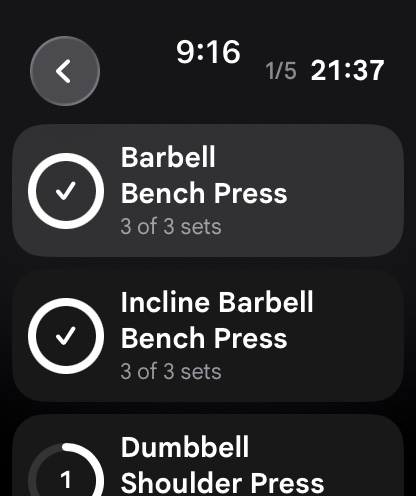
Google’s entry into the premium smartwatch market with the Pixel Watch lineup (Pixel Watch 1, Pixel Watch 2, and Pixel Watch 3) brought sleek, minimalist aesthetics, vibrant Actua AMOLED displays, and deep Wear OS integration to Android users. However, for serious resistance training athletes and gym-goers, the Pixel Watch presents both unique opportunities and specific hardware challenges. Out of the box, Google’s native fitness experience is powered by Fitbit, a platform historically optimized for step counting, distance running, and general wellness rather than heavy multi-joint strength training. When a lifter tries to log barbell back squats, rest intervals, and progressive overload using Fitbit’s default workout presets, the experience feels clunky and incomplete. Fortunately, by leveraging a specialized Wear OS workout tracker, the Pixel Watch transforms into a nimble, high-precision strength training tool.
In this technical breakdown, we examine the hardware engineering of the Pixel Watch series, critique native Fitbit gym tracking limitations, analyze sensor telemetry and haptic feedback, explain how to protect the domed glass casing during heavy lifting, and outline a complete phone-free training protocol paired with your workout tracker.
1. Hardware Architecture: Pixel Watch in the Weight Room
The industrial design of the Google Pixel Watch is distinct from rugged outdoor fitness watches. Its seamless, water-drop domed glass curve creates a gorgeous aesthetic, but weight rooms present distinct physical hazards. Understanding the internal and external hardware is essential for gym longevity:
- Custom Corning Gorilla Glass 5 Dome: Unlike flat sapphire crystal displays found on some competitors, the Pixel Watch features a 3D domed display. Because the glass curves around the perimeter of the watch, the edge of the glass is exposed to potential impacts from dumbbell handles, kettlebell bells, and barbell knurling. Using a low-profile TPU bumper or raised bezel protector during heavy lifting is strongly recommended to prevent accidental edge chipping.
- Haptic Crown with Fine Rotational Detents: The tactile rotating crown on the Pixel Watch 2 and 3 provides mechanical scrolling paired with Google’s custom linear resonant actuator (LRA) haptic motor. This allows lifters to adjust working weights in 1 kg or 2.5 kg increments and navigate exercise lists without touching sweaty glass.
- Multi-Path Optical Heart Rate Sensor: Starting with the Pixel Watch 2, Google integrated a multi-path PPG sensor paired with a skin temperature sensor and continuous electrodermal activity (cEDA) sensor. The multi-path architecture utilizes multiple LEDs and photodiodes across different angles, providing significantly higher tracking accuracy during high-force gripping (such as deadlifts and pull-ups) where single-path optical sensors often suffer from capillary blood occlusion.
- Qualcomm Snapdragon W5 Gen 1 Platform: Powering the Pixel Watch 2 and 3 with an ultra-efficient 4nm quad-core processor and dual-core co-processor, the watch executes complex real-time sensor processing and offline database queries with zero interface stutter.
2. Native Fitbit Limitations for Resistance Training
Fitbit is beloved by millions for casual step tracking, sleep staging, and aerobic cardio metrics. However, its resistance training module was never engineered for progressive overload. Lifters who attempt to use the stock “Workout” or “Weights” mode on Fitbit encounter several critical operational shortcomings:
- No Set or Repetition Logging: The default Fitbit workout app acts essentially as a glorified stopwatch with heart rate graphing. It does not allow you to log sets, input completed reps, record working weight, or note Reps in Reserve (RIR).
- No Automated Rest Interval Timers: In strength and hypertrophy training, standardized rest intervals are critical for hormonal and neurological recovery. Fitbit provides no automated countdown timers between sets, forcing lifters to mentally estimate rest periods or use external smartphone apps.
- Lack of Standalone Phone-Free Routine Execution: Fitbit’s interface does not support structured routine templates (such as Push-Pull-Legs or Upper-Lower splits) with pre-loaded target rep brackets.
- Aerobic Calorie Bias: Fitbit’s metabolic algorithms are calibrated for continuous steady-state cardiovascular exercise. During anaerobic resistance training, heart rate spikes during the set and drops during rest periods; standard algorithms frequently underestimate the metabolic cost of high-intensity muscular work while overestimating calories during resting intervals.
3. Feature Matrix: Stock Fitbit vs. IMPOLS on Pixel Watch
The following table contrasts the stock Fitbit experience against a dedicated resistance training system on the Pixel Watch:
| Feature / Capability | IMPOLS on Pixel Watch | Stock Fitbit Workout App | Generic Android Fitness Loggers |
|---|---|---|---|
| Full Strength Set Logging | Standalone set, rep, RIR, and weight input | None (time and heart rate only) | Requires phone companion app nearby |
| Tactile Crown Navigation | Smooth rotational weight & rep increments | Basic vertical scrolling only | Touchscreen only; no crown support |
| Automated Rest Countdown Haptics | Crisp LRA haptic pulse with auto-advance | None; no rest intervals | Audio alert easily drowned out in gym |
| Health Connect Integration | Native two-way sync with Google Health Connect | Fitbit cloud locked; partial export | Proprietary databases without sync |
| Muscle Fatigue Telemetry | Direct sync with muscle recovery body map | None; general cardiovascular recovery | None; isolated exercise records |
| Cross-Platform Ecosystem | Full sync across Android, iOS, and Apple Watch | Limited to Fitbit app ecosystem | Single platform only |
4. Essential Pixel Watch Settings for Gym Training
Before stepping onto the gym floor with your Google Pixel Watch, configure these essential system settings in the Pixel Watch app and watch menu:
1. Enable Always-On Display (AOD)
During heavy lifting exercises such as bench presses, overhead barbell presses, or lateral raises, performing an exaggerated wrist flick to wake the screen is impossible. Open Settings → Display → Toggle “Always-On Screen” to On. This ensures your active exercise timer and rest counter remain visible at a glance.
2. Maximize Haptic Feedback Strength
Google’s haptic motor is subtle and refined, which feels great for text messages but can be missed when wearing tight wrist wraps. Open Settings → Vibration → Vibration Intensity → Set to “Strong”. In the IMPOLS watch app, enable “Triple Haptic Alert” so that three distinct pulses signal the completion of your rest interval.
3. Configure Crown Orientation for Lifting
If you wear lifting straps or heavy wrist wraps, aggressive wrist extension during front squats or pressing can cause the back of your hand to depress the physical crown, accidentally launching Google Assistant or pausing the workout. Open Settings → Wrist Orientation → Set the crown to face inward toward your forearm rather than toward your hand.
5. Step-by-Step Protocol: Executing a Phone-Free Session on Pixel Watch
To experience the focus of phone-free training on your Pixel Watch, follow this 4-phase protocol:
Phase 1: Pre-Workout Routine Caching
Open your workout tracker on your Android smartphone before your training session. Select your scheduled workout (e.g., Pull Hypertrophy: Weighted Pull-Ups, Barbell Rows, Cable Face Pulls, Incline Dumbbell Curls). Set your target weights and automated rest timers (e.g., 150 seconds for rows, 75 seconds for curls). Sync the routine to your Pixel Watch tile.
Phase 2: Transitioning to Autonomous Standalone Mode
Stash your smartphone in your locker. On your Pixel Watch, swipe left to the IMPOLS Quick Tile and tap “Start Workout”. The app loads your complete routine into local watch memory, operating completely offline without requiring an active cellular or Bluetooth connection.
Phase 3: Set Completion and Rotational Crown Logging
Complete your working set on the gym floor. As you step away from the equipment, glance down at your watch. The display shows your target reps: rotate the physical crown to adjust reps or weight if needed, and tap the confirmation checkmark. Your set data is saved locally, and your rest countdown timer activates with high-contrast numerical tracking.
Phase 4: Syncing Telemetry with Health Connect
Upon completing your workout, tap “Finish Session”. When your Pixel Watch reconnects to your phone, the full volume load and cardiovascular data broadcast to Google Health Connect, instantly updating your nutritional expenditure in your food tracker and logging muscular recovery in your muscle recovery tracker.
6. Battery Management: Powering Long Gym Sessions on Pixel Watch
Because the Pixel Watch features a compact battery (306 mAh on Pixel Watch 2, up to 420 mAh on the 45mm Pixel Watch 3), optimizing power consumption during intense sessions is important:
- Monochrome AMOLED Theming: The IMPOLS watch UI utilizes true pitch-black backgrounds (#000000). On AMOLED screens, black pixels consume zero power, reducing screen battery consumption by over 50%.
- Disable “Tilt-to-Wake” During Lifting: If Always-On Display is active, disable “Tilt-to-Wake”. This prevents the watch from cycling between full-brightness and ambient states during repetitive arm movements like curls or presses.
- Disable Background Wi-Fi: Turn off Wi-Fi in watch settings before training. The watch relies on low-power Bluetooth or local offline execution, saving up to 8% battery per hour.
7. Biomechanical Sensing: Accelerometer and IMU Velocity Analysis
The Pixel Watch houses a high-precision 6-axis IMU (Inertial Measurement Unit) capable of sampling motion data at high frequencies. In high-performance strength applications, this data feeds into intuitive training algorithms to track mean concentric velocity and bar deceleration.
By measuring how rapidly the watch accelerates during the concentric phase of a lift, the algorithm provides objective feedback on fatigue accumulation. If your repetition velocity slows by more than 25% from rep 1 to rep 8, the app flags that you are reaching true mechanical failure, providing objective Reps in Reserve (RIR) validation without subjective bias.
7b. Pixel Watch 3 45mm vs 41mm: Screen Real Estate in the Gym
With the release of the Pixel Watch 3, Google introduced two case sizes: 41mm and a new 45mm model. For resistance training athletes, the 45mm variant offers substantial ergonomic benefits. The 45mm display provides 40% more active screen area and reduced bezel borders, allowing the IMPOLS interface to render larger, high-contrast numerical weight dials and rest timer countdown digits.
When you are gasping for air following a grueling set of Romanian deadlifts or walking lunges, glancing at a larger 45mm display makes reading your target load and remaining rest seconds effortless without squinting. Furthermore, the 45mm model houses a 35% larger battery, comfortably handling multiple long lifting sessions and continuous nocturnal sleep tracking on a single daily charge.
7c. Continuous Electrodermal Activity (cEDA) and Training Stress
The Pixel Watch 2 and 3 include a specialized continuous electrodermal activity (cEDA) sensor that detects micro-changes in sweat gland excretion and autonomic nervous system arousal. While Google utilizes this sensor primarily for psychological stress detection, in an athletic strength context it provides fascinating physiological telemetry.
During heavy compound lifting, acute sympathetic nervous system spikes trigger sudden microscopic surges in skin conductance. Tracking autonomic stress arousal alongside your sets in your workout tracker provides empirical validation of systemic neurological demand, helping you gauge true physiological recovery on your companion sleep and recovery tracker.
8. Frequently Asked Questions
Can I track workouts with a Pixel Watch if I don’t have an LTE model?
Yes. The standard Wi-Fi/Bluetooth Pixel Watch stores workouts, routines, and exercise histories locally in on-device flash memory. You do not need an active phone connection or LTE plan while lifting in the gym.
Will the Pixel Watch crown get damaged from heavy kettlebell cleans?
Direct impacts from heavy cast iron kettlebells against the crown can cause damage. When performing kettlebell snatches or cleans where the bell rests against the wrist, spin the watch face to the inside of your wrist or use a padded sweatband over the watch casing.
How does the Pixel Watch compare to the Apple Watch for lifting?
Both smartwatches offer exceptional haptics and fluid user interfaces. The Apple Watch features flat sapphire glass on its Ultra models, while the Pixel Watch offers a sleeker, circular aesthetic and deep Google Health Connect integration.
Does tracking lifting on Pixel Watch drain the battery for sleep tracking?
A typical 75-minute lifting workout consumes approximately 12% to 15% battery on Pixel Watch 2 and under 10% on Pixel Watch 3 45mm. A quick 20-minute top-up charge while showering provides ample power for overnight sleep and HRV tracking.
9. Summary and Pixel Watch Setup Checklist
The Google Pixel Watch is a remarkably sleek and capable strength training companion when liberated from basic fitness presets and paired with dedicated lifting software.
- Equip a low-profile bumper case to shield the 3D domed Gorilla Glass from knurling scratches.
- Enable Always-On Display and configure haptic intensity to “Strong”.
- Reverse the crown orientation if wrist wraps cause accidental button presses.
- Pre-load your routines in your workout tracker and leave your smartphone in your locker.
- Use the physical rotating crown to adjust weights and reps with tactile precision.
- Sync volume data to Google Health Connect to harmonize with your macro targets and monitor autonomic recovery via a sleep tracker.